Google has introduced a new option for its Nexus lineup of accessories, which now includes the Google Live Case. What makes the Live Case special isn't really that special, many case manufacturers have been printing custom images over cases for forever. What makes this such a good thing though is that usually those custom brands will only print cases for popular phones like iPhones and Samsung Galaxies.
But that's not all. The Google Live Case isn't just any old custom case, it has a custom NFC button on the back that, when pressed, will allow for many custom actions. (Such as launching an app, toggling settings, turning on a flashlight, etc.) This is super helpful and incredibly smart for a case to include. This isn't the first time Google has created Live cases, though. Back when the Nexus 6 was Google's current flagship, Google announced the "Skrillex Live Case" which was basically the same thing, but used as advertisement for Skrillex's tour. I guarantee someone at Google saw the potential with the NFC button in that case design and decided to adapt it to the current customizable model.
There are multiple options to customize the case itself through Google's Live Case studio, which lets you not only upload images, but scale, move, rotate, apply filters, and view it in 3D. Even if you don't have a photo to use, you can choose a place through Google Maps that is important to you to display on the case. After you apply the case, you can press the button to get the Live Cases app, which can put the image or place you selected as your background and unlock the NFC button.
So to answer the question in the title, yes. I will be getting a Google Live Case for my Nexus 6P. Normally I'm not a case person, as I've talked about. But the ability to add my own personal flavor on a case that the manufacturer approves, combined with added functionality of the NFC button makes this an offer I can't refuse. Unfortunately, it's going to take about a month for it to get to me due to this being a preorder. I'll definitely post what it looks like when it comes, though!
According to Android Authority, Alphabet, Google's holding company, is looking to create a 21st century tech city. Along with Google, Alphabet holds a bunch of smaller companies. One of these is Sidewalk Labs, which looks to improve city living through technology. Tackling problems such as overcrowding, energy usage, transportation, and connectivity, Sidewalk Labs, and by extension Alphabet, are looking for a likely candidate to transform.
Regardless of what city they choose, imagine a tech giant, especially Alphabet, taking complete control in designing a city's infrastructure. Imagine what could be accomplished! Of course, with Google's connections with Fiber and Project Fi, I can only imagine that they would have city-wide public Internet. I'm curious if Google will be able to secure a network that large, however. Something else to keep in mind is that a city like this would be a haven for self-driving car testing. I could for sure see a city such as this becoming the breeding ground for self-driving cars.
These are the obvious things, but there are less conventional things I would love to see in a tech utopia such as this. Firstly, a central transport system that is easy and cheap to access. Trains are crowded and nobody wants to drive with all that traffic in big cities. Alphabet has the resources to get around this problem, and I want to see them be creative with it. Second, it'd be really interesting to see what they could do in terms of laws and electing officials. If it is a true city, a mayor would need to be elected as well as other city officials. Would Alphabet look to unconventional methods in terms of the voting process as well? And could these methods be adopted into larger forms of election?
Alphabet City, while terribly capitalistic, could result in amazing technical innovation. I would certainly move there.
Thanks to Android Central, they've uncovered an interesting file structure change in the first Android N developer preview, which could mean huge things for the future of Android. This is almost all speculation and hope that Google is actually doing this, so if you don't want to be potentially disappointed, don't continue.
Google has been heavily criticized in the past and present for its fragmentation. Well over half of Android users are on a pre-Lollipop version. Lollipop was released at the end of 2014. Many compare this to Apple's total control of the OS and consider it a terrible thing. In fact, I wrote a post about fragmentation quite a while ago. I think it is a user issue, but if Google can step up its game and gain more control over updates, I certainly won't complain. And that's exactly what Google may be trying to do with this structure change.
The structure change is very subtle, Google is separating Android's core OS and UI elements. But why? Google has to have done this for a reason. Android Central speculates that it's because they're going to push OS updates directly to skinned devices like Samsungs, without interfering with the OEM's skin. These OS updates could involve security updates, new features, API updates, etc. If Google can gain control of the under-the-hood updates, it will greatly increase the security of everyone's devices. Usually when a major vulnerability is found, something a hacker can exploit, Google fixes it fairly quickly. Nexus devices receive monthly security updates to combat this. Unfortunately, these fixes do not reach most other devices running Android for sometimes months. That's because OEMs like Samsung, HTC, and LG have to take this Android update that Google has released and apply their skin to it again, as well as bug test. Depending on individual OEMs to deliver the security updates that Google releases is like the U.S. government depending on civilian militias to defend the country. Security is much more air-tight when updates can be applied to most Android devices right from the source of the patch. Not only is this move better for security, it makes it easier for OEMs to skin Android to their liking without completely messing with core system files. This means faster, less buggy skinned devices. When most Android devices are skinned, this is a big deal.
But let's look at the downside. It's no secret that I'm not a huge fan of skinned versions of Android, which is why I have a Nexus. But this change, making it easier to skin, would fragment Android in a way that may cause different skins of Android to be too different. When Google has an idea for a UI, and Samsung wants something else, and HTC wants something else too, we have a race of competing design standards that could clash when these are all on the same, core platform. My only hope is that if Google does go through with this change, they create more rigid rules for OEMs. But that's just me.
Either way, if Google does do this, it's going to be good for pretty much everyone. It's going to increase security and keep devices updated without waiting on OEMs to push updates through. Let's just hope that that's what Google is actually doing with this subtle change.
Project Fi isn't exactly a household name. It's a new wireless network created by Google that only currently supports Nexus devices. But not only is it one of the best things to come out of Google in a long time, if it gains enough popularity, it could surely change the world of wireless networks forever.
So, what makes Project Fi different? Fi uses two different networks, Sprint and T-Mobile, and intelligently switches between them to find the best option. Not only does it switch between data networks, it can also connect to specific WiFi hotspots that Google deems safe, such as Starbucks WiFi. Even though these networks are safe, Google still automatically connects you through a VPN so there is no question whether your data is secure. This intelligent data-hopping is something I have never seen before, and it could really help save precious GB at the end of the month.
Speaking of GB, Fi offers an interesting take on what data plans in the 21st century should be. Instead of a fixed monthly price for an allocated amount of data, Fi lets you pick what you think is best for you, and then refunds you the difference. Fi starts at $20/mo, and then it's +$10/mo for each GB. Let's say you buy 3GB, so you're paying $50/mo. But let's also say that you only use 1GB. That extra $20 worth of data is credited to your account, so you only pay $30 for the next month! It's a brilliant system that provides a level of flexibility I have never seen.
Not to mention all the other amazing features that Fi offers, such as the same $10/GB model internationally, the ability to connect with Google Hangouts to talk/text on multiple devices, WiFi calling, and a simple to use management app. Project Fi also heavily discounts the Nexus 5X to a price of only $199. That's incredible! Personally, I'll be switching to Fi the second my current plan runs out. I can't wait!
Google, in a move nobody was expecting, decided to release the full Android N developer preview to the masses today. I'm currently downloading it on my Nexus 6P, (because I'm a rebel like that) so while that's happening, let's talk about the various changes that Google has introduced to Android today.
First off, the most interesting thing about Google's changes today isn't even to Android itself. Along with the release of the dev preview, Google has launched the Android Beta Program. This allows anyone with a compatible Nexus device enroll in over-the-air beta updates. This is a huge change compared to what they did with Android M. With M, if you wanted to participate in the developer previews, you had to manually flash them. Most people do not know how to flash system images, so this put up a large wall for user feedback. I can't say whether Google choosing to make this process easier will be beneficial or not. On one hand, you have more people becoming engaged in the future of Android. On the other, you have a lot of people who don't know what they're doing installing the beta and complaining about bugs.
On to the features! Android N has added various improvements that keep it competitive with Apple. Usually, I'd say Apple is playing catch-up with Android, but Android N does this to iOS in many ways. First of all, it finally adds multi-window support, something that Google is hoping to expand their tablet market. It's been a long time coming. Second, the addition of a f.lux-like screen tinter is also something iOS has added recently. That's about where the similarities stop, though. Back from the early Android M builds is the dark theme, which turns various UI elements dark instead of white. The notification shade and quick settings have also been restyled to a more modern look, taking up 100% of the width of the screen. Speaking of notifications, Google has added an official API for text input within notifications. Think of quick-reply being fully supported in the OS.
There are also tons of new features being discovered right now, as the preview was only released a few hours ago. I sure can't wait to go explore them! Looks like my apps are being optimized, gotta go!
Android is famous for being customizable. When you think of iOS, you think of a grid of icons as your home screen. That isn't true for Android. Android flaunts a more desktop-esque layout for its home screen, and a major part of that is the app drawer. The app drawer holds all the apps that you don't want on your home screen. Lately there has been some rumors of Google getting rid of the app drawer in Android N, and there is more and more evidence to support it every day. Also, manufacturers like LG have already chosen to get rid of the app drawer in the LG G5. But... Why?
The above tweet is the major cause for us to believe that the next version of Android will not have an app drawer, but Android Authority reports that multiple inside sources have informed them that Android N currently does not have one.
So why? Well, many think it's for a more "simplistic" approach in order to make it easier for users, but personally, I think it does nothing but crowd the home screen. Others are wondering if Google is planning on replacing the app drawer with a search bar to find your apps. Either way, I'll stick with my app drawer. The app drawer is the "overflow" of information that you don't need right on your home screen. But the good thing is, even if Google does choose to get rid of it, there are always custom launchers like Nova to take its place. That's what makes Android great.
A lot of people are having the idea that Android can be a separate entity outside of Google and it will be successful. This is true in very limited circumstances, which I will go over, but most of the time and in the widest cases, Android is Google's. Android, or AOSP (Android Open Source Project) is licensed under the Apache license. The Apache license is a fancy legal term which basically allows for anyone to copy the source code of Android and use it for anything they want, as long as it doesn't go against the terms of the license. This means that companies like Cyanogen, Inc. and Amazon can take Android, modify it, and release it for profit. So why isn't everyone doing this?
Google takes strict control over small but important parts of Android that make it, well, Android. These parts are called the GApps, or Google Apps. Things like the Google Play Store, Google Maps, Google Now, Google Calendar, and Chrome are not licensed under Apache and are Google's property. Imagine Android without the Google Play Store, the most important aspect of GApps, or Google Now on modern Android versions. Most people wouldn't want this, except in very limited cases. So the reason you don't see tons of versions of Android that are vastly different from stock is because Google will not let them use their GApps unless they comply with some rules. Personally, I think these rules are important. They are what keep Android as a central operating system and what keeps things consistent across device manufacturers. Without a central power in charge of the OS it could go the way of many Linux distros, all vastly different and unrefined. One could argue this as a strong suit, but while I think choices are important in your OS, I don't think the OS should be too different to become unrecognizable. This only creates inconsistent apps and confused users.
Amazon is one of the only successful worldwide companies I can think of that releases a fork of Android that does not include GApps. The reason Amazon can do this and get away with it is because Amazon is a large company and markets its tablets not as Android tablets, but as their own separate Fire e-readers. When people buy an Amazon Kindle Fire, they aren't expecting Android, they're expecting a Kindle Fire. Amazon has the resources to make this branding speak for itself instead of piggybacking off of Android, something few other companies have. As a result, their app store is semi-successful, (although hardly anything compared to the Play Store) as well as the Kindle Fire itself. The only other company I can think of that could do something similar and succeed is Samsung, simply because they hold such a wide market in Android. Samsung already has a bunch of its own stores and apps, but they're coupled along side GApps. Neither the Kindle App Store or Samsung's app stores can compete with Google Play, though.
This is in America, but elsewhere in the world, especially China, manufacturers do not include GApps on purpose. Google is largely blocked in China, so smartphone manufacturers like Huawei, Xiaomi, OnePlus, Oppo, and more are forced to not include them. Because of this, different manufacturers have vastly different themes, skins, and forks of Android because they don't have to follow Google's guidelines.
Xiaomi's MIUI
OnePlus's Hydrogen OS
Cyanogen, Inc. has made headlines in the past year for their CEO's comments about taking Android away from Google. They're ridiculous and would never work in a US or European market. Cyanogen is cocky because of its new investors, and it isn't sustainable if they want to expand into major markets. Their best bet is to stay in emerging markets like India and China if they want to avoid Google's rules. In America they had semi-success with the OnePlus One launching with Cyanogen OS, but it also included GApps. And before long, that relationship fell apart due to their irresponsibility as a company. Cyanogen doesn't have a chance to take Android away from Google in a global market, and neither does anyone else. The Google Play Store's major library prevents it, as well as how Google is starting to integrate their services more and more into the OS.
Virtual reality has been in the news for the past few years for its major advancements, but we aren't even on the brink yet. Google, Microsoft, HTC, Valve, Oculus, and more are all into the VR game. This amount of competition hasn't been as strong for any individual field in years.
Oculus made major headlines with the Oculus Rift, marketed as the first major VR headset for the masses. Facebook has since taken over Oculus, which caused quite a lot of backlash. While it still isn't completely ready for everyone to use, everyone is certainly impressed by it. Following suit comes everyone else. Google Glass was a big thing for about a year before it regressed back into the experimental labs of Google, but while it was popular everyone was imagining what could be possible with VR in the near future.
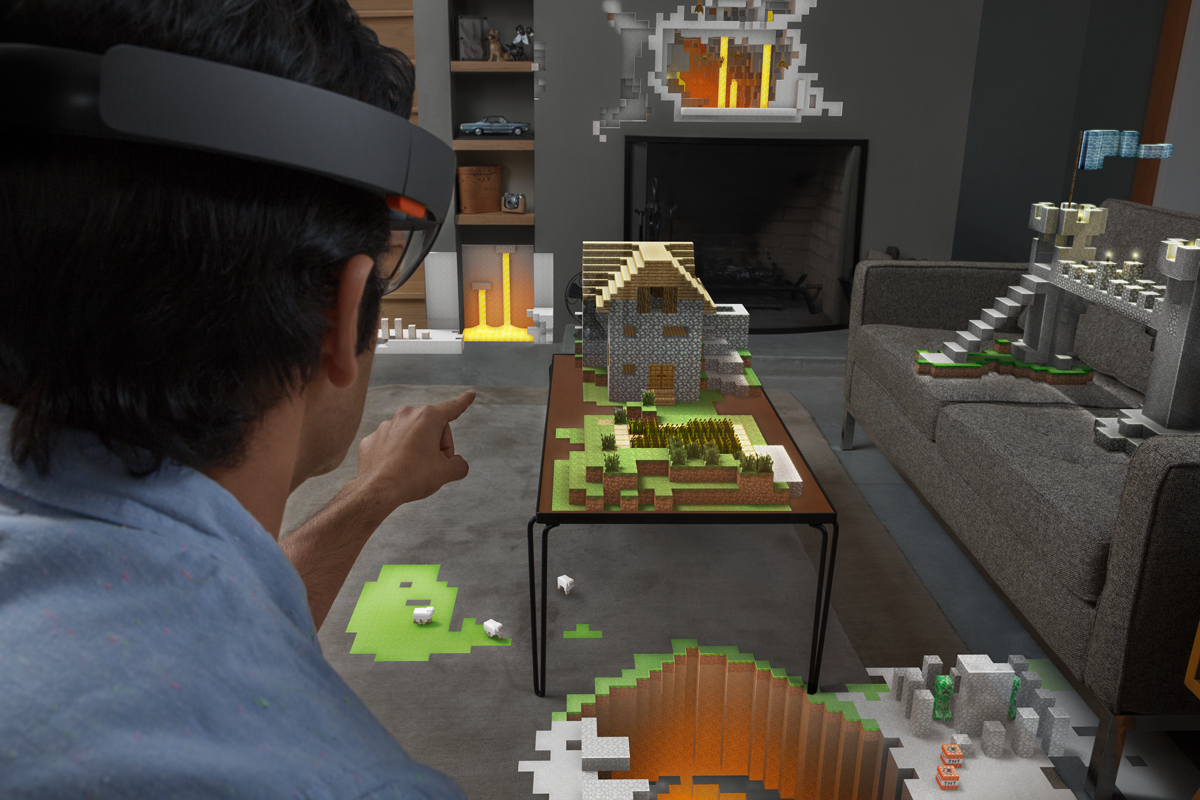
Microsoft's HoloLens made one of the coolest tech demos in history last year by providing a VR headset that merges VR and reality. This isn't simply viewing a fake world through a screen, this creates objects on top of the real world and allows you to interact with them. Imagine a fake Minecraft world on your coffee table. That's what HoloLens is aiming to do.
Google isn't done with VR simply because they're taking a break from Glass. This month they officially announced their virtual reality division, meaning they have a team of VR experts working on it all the time now. Google's Cardboard is probably one of the more interesting VR concepts. It isn't anything fancy, but that's the point. If you're looking for a good VR experience without shelling out hundreds of dollars, Cardboard has you covered. I got a free Google Cardboard simply by following Google's Twitter. You place your phone in the headset and install Cardboard-compatible apps. They aren't fancy, but they give you a feel for VR if you've never done it before. As my dad said, "I've never seen anything like this before. Wow."
HTC Vive is another attempt at VR, focusing on gaming. Vive allows you to walk around the room and explore your surroundings while warning you of any nearby obstacles. Vive partnered with Valve, a major game creator, in order to ensure their focus on gamers.
Lastly, there's the mysterious Magic Leap. Google invested just under a billion dollars in the startup last year, and since then there hasn't been much talk. The company is very secretive, not even releasing a look at their product. The most we have are renders of what the view behind it might look like, and one small tech demo.
With so much competition from various companies, from Facebook to HTC, VR is going to explode in the next decade. I can't even imagine all the things possible with it.
AI isn't science fiction. You hear about the human-like programs that will overtake humanity, (which I talked about in my "Machine Labor, AI, and the Technological Singularity" post.) but what you don't hear about is how AI is hugely beneficial to humans. Incredibly useful and interesting advancements in the field of AI are made every day.
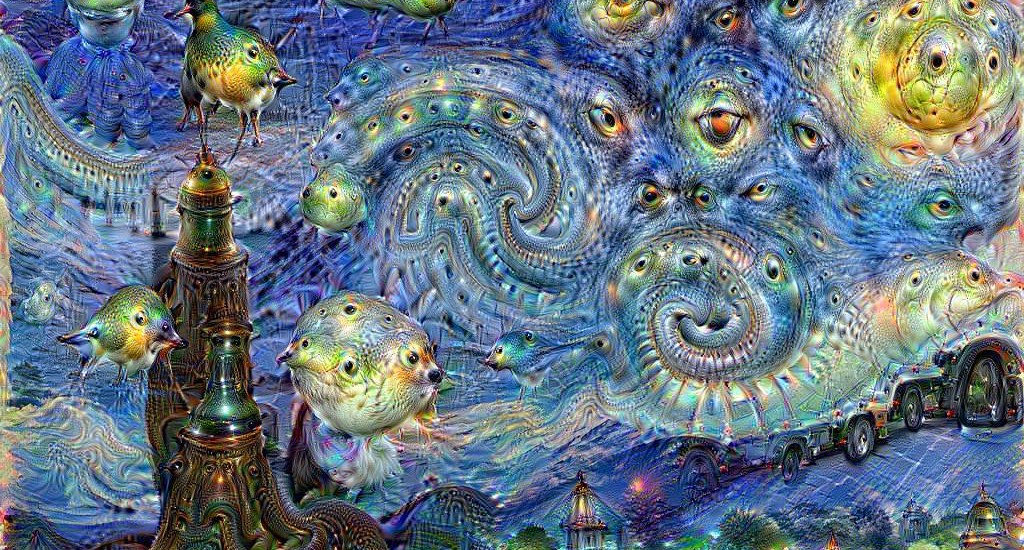
Google has made many advancements in AI possible, as well as made them available to the public. Google Photos uses neural networks to understand what is in an image and display relevant images, keywords, and allow for search of what's in the image. Google Photos lets you search for say, "dog", and it will understand which pictures have a dog in it. Everyone is familiar with Google Images, but it's currently vastly different than what Google is doing with AI. Google Images searches websites and file names for relevant images and displays them. That's why searching for one thing can sometimes lead to something completely different. Google's new neural network algorithm understands what is actually in the image. You can see a visual effect of this with Google's "DeepDream", which provides a sort of viewpoint of what their neural network sees. Any image can be put through it, you can see what the computer thinks is there.
SwiftKey has been my Android keyboard of choice since my first Android phone. In the past few months, SwiftKey has been working on a keyboard that bases predictions and corrections on a neural network AI. Presently, SwiftKey looks at your last few words typed and will suggest words that many people put after. SwiftKey's Neural Alpha examines actual word relations and understands the meaning of words. SwiftKey Neural clusters similar words and understands sentence structure. After using SwiftKey Neural Alpha for a few months, it's leagues ahead of any other keyboard prediction I've seen. The old model doesn't actually understand how humans speak, it simply suggests words that are frequently placed after the last few. In practice, this leads to suggestions that don't make sense. When SwiftKey's Neural network examines the whole sentence, it uses all of the words to predict an accurate continuation.
Go is an ancient Asian board game still extensively played in China and Japan. Google made history recently by creating an AI that beat the European Go champion five times out of five. This probably doesn't seem significant. We've had bots beat humans in chess, and lots of other games. Why is Go different? Well, Go is extremely complex with more possible moves than there are atoms in the universe. Usually, a bot will scan the possible moves for the most advantageous position to best their opponent. This isn't possible with Go due to the sheer number of possible moves. When humans play Go, they rely strongly on instinct. In order for the AI to replicate this, Google had it study and understand games played by humans. Afterwards, the AI played against itself thousands of times in order to gain a deeper understanding. If an AI can master Go, a game once considered an art that must be mastered by any Chinese scholar, what can't it do? The progress of AI is expanding at an exponential rate. Whether this is scary or exciting depends on your opinion, but the fact is, AI is not only something done for purely research purposes, but also for practical use in every day life.
Google introduced its design language, dubbed Material, in 2014 as a proposed solution to make its OS distinctive and replace the outdated Holo design language. The goal of Holo was to standardize the designs used across different versions of Android and make Android more uniform. Holo was a mostly dark look, with electric blue accents. While many loved Holo for what it was, it was definitely time Google stepped up its game in terms of design to keep up with Apple. In comes Material.
Material (left) vs Holo (right) settings apps
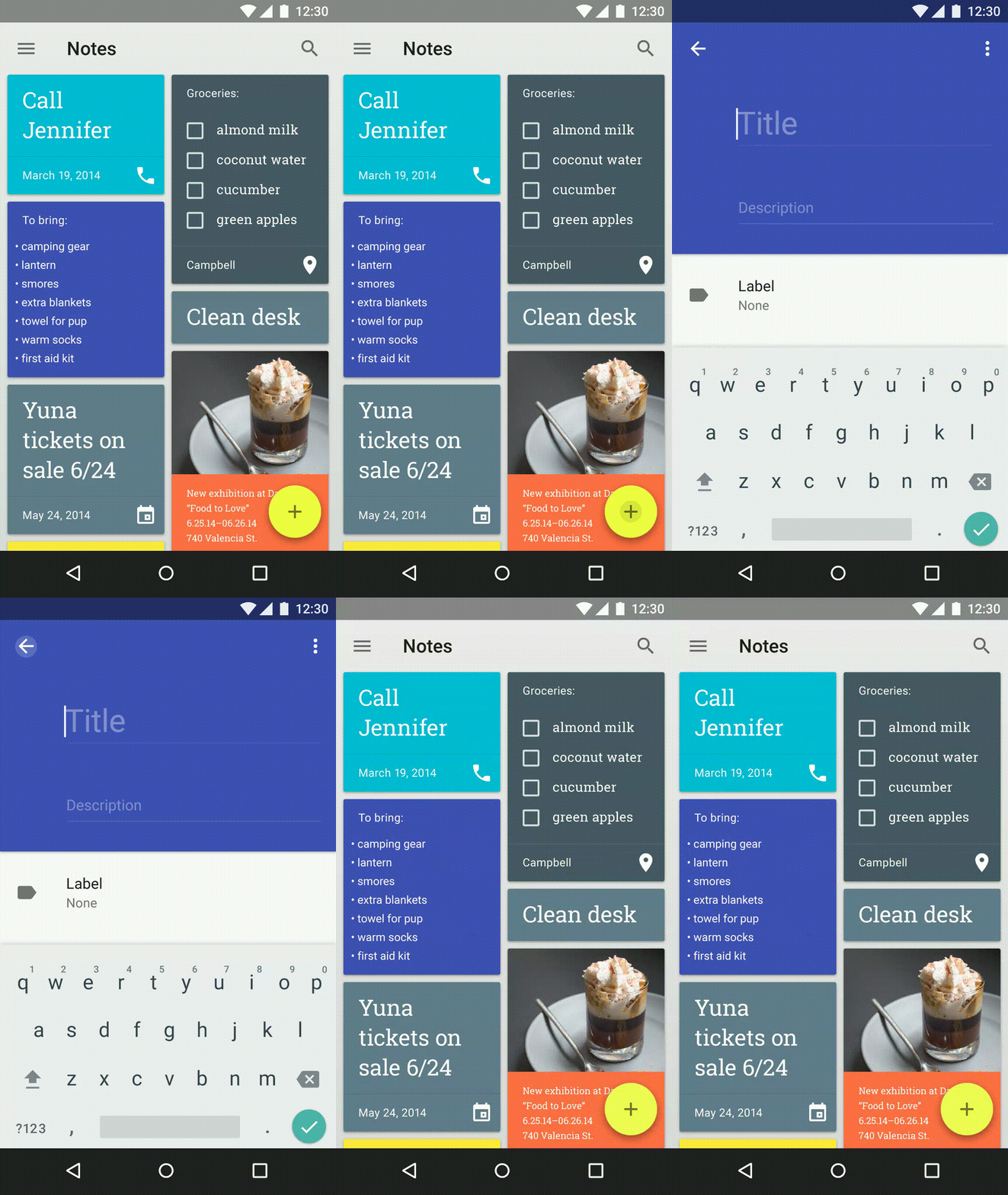
Material Design was code-named "Quantum Paper" by Google before it was announced, and this is a good description. It was announced at Google I/O 2014 along with Android L, later known as Android 5.0 Lollipop. Distinctive features of Material Design is a lighter interface with distinctive, vibrant colors and a huge focus on animations. Pre-Material, Android was pretty static in terms of animations. Sure, you had some simple ones across the operating system, but the ones that were there were pretty unimpressive. Material's major focus is providing context through animation, and adding depth to the interface. If you press a button, instead of a screen suddenly appearing, the screen should grow from the button. This provides an understanding of what event is triggering what, and frankly, an amazing example of great design. Depth is used by making subtle shadows underneath certain elements. This allows items to be on top of each other and still look great. FABs, or Floating Action Buttons, are another common theme among Material apps. They provide a place for the user to interact without requiring the developer to allocate space in an otherwise unneeded place in the app. The FAB gets out of the way when it isn't needed, and can display new options when tapped.
Good examples of Material Design are those that use the design language to create apps that follow the rules set across by Google, while also injecting a bit of originality and brand recognition. The best example of this I can think of is with the Tumblr app. It isn't a Google app, but it follows Material Design extremely well. It's not perfect, but it uses cards, distinctive animations, and depth to create an app that feels material, while also feeling like it's still Tumblr. Basically any app by Google has amazing Material Design as well.
A bad example of Material is Sleep as Android. It's a great app, don't get me wrong, but its adoption of material was half-assed, for lack of a better word. It doesn't do many of the things that Material apps should do. It feels like it's trying to give its users the impression of it being Material without putting in any of the work. It has a FAB, but its placement is off and tapping it is not animated. Actually, almost nothing in this app is animated better than the Holo days. The toggle switches aren't even animated! The UI is a weird combination of half-baked Material over a Holo base.
Material isn't just needed to make apps look better, it's needed to make Android look better. If apps do not follow this design language it fragments Android and makes it confusing to the user. Imagine if every app you open had a completely different layout and style. Different stylistic choices are great, but if you're making a modern Android app, please use Material in the way it's intended instead of half-assing it.
When I first saw the initial leaks of the Nexus 6P, I was unimpressed and almost entirely set on getting the 5X as my next device. That was true, at least, until Google announced the prices and specs of these phones. The Nexus 6P is a much better bang for your buck, and I'd consider it the best possible smartphone on the market right now.
The fingerprint sensor, called Nexus Imprint, is insanely fast and accurate. Having it on the back may be an interesting change for people who are used to having it on the home button like Apple and Samsung, but personally, I like it on the back better. My finger naturally reaches it when I pick it out of my pocket and a lot of the time it's already unlocked when I bring it up to my face. To unlock from a tap of the fingerprint sensor, it takes just around one second. I timed it. When it is unlocked it directly goes past the lock screen, which is really handy.
The front facing speakers are another high point I thought I'd never use. I'm really used to using headphones all the time, but a few days ago I sure was glad I had these speakers when my friends asked someone to play some music and I knew my phone could produce the best and loudest sound.
The camera may not have the most megapixels, having a modest 12.3. But it does definitely get the job done by having a much larger pixel than other phones. When the pixels the camera takes are larger, this means it can let more light in. The result is better low-light pictures and all pictures are more vibrant. This is the best phone camera I've ever owned.
...
The metal body feels incredibly premium. I have absolutely no complaints there. I chose to get the graphite model, and my only complaint about it is that the black sort of hides the diamond cut edges of it. In pictures, the aluminium model looks much nicer there. The reason I chose to get the graphite version instead of any other color is because I thought it would look better with a dbrand skin. I feel like a skin or case is required with this phone, because the metal is fairly thin and dents easily. That combined with the slippery surface makes for a bad combination for drops.
The battery definitely gets the job done. Whether it's better or worse than my OnePlus One which was famous for its great battery life, I cannot say. It definitely gets me through the day with at least 4 hours of screen-on time. I've only had one issue with the battery life, and that was caused by a Google Play services bug which caused it to keep my device awake. Weird, but not unheard of. A reinstallation of Play services fixed the issue. Marshmallow's Doze and App Standby features can result in completely flat lines of battery usage over hours of non-use.
I don't know whether it's Marshmallow, the phone, or a combination of the two, but the 6P is incredibly fast and smooth. I've never used a phone this fast before. Marshmallow's added animation refines what Lollipop set out to do and makes the experience much smoother. When I first got the phone I ran a quick AnTuTu benchmark, with the 6P earning 70924. While that isn't the best ranking around, it sure stacks up to the competition.
I'm incredibly happy with this phone, and I have to say, the fact that it's a Nexus is the best thing about it. I didn't get Nexus Protect, but the ability to have your phone protected for 2 accidental drops is incredibly comforting for those who do. One week after I purchased my 6P, the price dropped $50 on the Google Store. I wasn't worried, because I knew Google Nexus had a famous reputation for keeping their customers happy. From giving price change refunds to repairing Nexus 5 screens for free, Nexus has had a long history of great customer service. Sure enough, one five minute online chat with customer support resulted in $50 being refunded. I didn't have to do anything except message them. They even wished me a merry Christmas! If only every company could be this good to their customers.
Overall, I give the Huawei Nexus 6P a 10/10. There isn't much wrong with this phone. Newest possible clean software, well sufficient specifications, nifty features such as the fingerprint sensor, and the Nexus brand makes this a phone anyone would love to have. It's a pleasant experience for both the techie and the common buyer. If you're looking for a new phone, definitely consider the Nexus 6P, which is now $50 off on the Google Store!
That's right. Today I purchased the Huawei Nexus 6P for just over $500. (If this price seems odd to you, you should probably read my "Your 'Free' Smartphone Isn't Free, and Why You Should Buy Unlocked" post.) This is going to be replacing my OnePlus One, and seeing how competitive that phone was in the "last generation" of flagship smartphones, I'm going to be comparing it to the Nexus 6P in terms of features and specifications. The OnePlus One should serve as an example for the last generation of smartphones compared to the best of today. You should also be expecting a full review of the Nexus 6P as early as next week.
First, the Nexus 6P has an amazing latest-gen Samsung Quad HD AMOLED display. If that's a lot of gibberish to you, let me explain. Samsung makes some of the best displays in the smartphone industry. Amazing colors, high DPI, the best technology. Quad HD (1440p) is 33% higher resolution than the common 1080p found on the OnePlus One. OnePlus's 1080p display is also IPS LCD, which is generally considered worse than AMOLED. What makes AMOLED special is the fact that blacks are as pure as they can be. When a pixel is black on an AMOLED display, it is actually turned completely off. This makes for rich blacks and also saves battery.
The Nexus 6P's camera has been, surprisingly, heavily acclaimed by pretty much everyone. This is a huge change from the previous camera-related infamy of the Nexus brand. In fact, the camera is so good, it has climbed to the #3 ranked smartphone camera on dxomark.com. While it only has 12.3 megapixels, those pixels are considerably larger than most smartphone cameras.
The larger the pixels are, the more light is collected. This allows for better pictures all around. The 6P has been praised for its amazing low light performance, likely thanks to those large pixels. So while the 6P may not have the most megapixels, it sure takes some amazing pictures. It also has laser autofocus, which makes for quick and accurate focusing on objects. The OnePlus One, on the other hand, lacks this. It also has much worse low light performance.
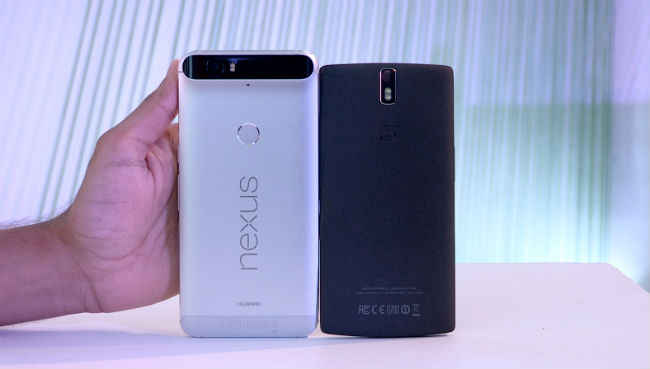
The OnePlus One's build quality was praised for feeling good in the hand at a low price. Unfortunately, this just doesn't match up to the all metal build of the Nexus 6P. The OnePlus One had a new material called sandstone black, which had a unique texture to it. Problem was, it wore off fast and attracted lots of dirt. Not only that, but the "metal" edges around the One aren't even real metal. They're painted plastic. Talk about a let down. I've chipped mine from dropping it in one corner, revealing the very un-premium material underneath. The Nexus 6P has an all metal unibody, making it feel much more premium than anything else.
Time to move on to things the 6P has that the One simply lacks. A fingerprint sensor, for one, is a major selling point to me. We unlock our phones dozens if not hundreds of times per day, I think it is a good investment to save that portion of your time from entering in passcodes. Not only does it have one, it's apparently ridiculously fast. (I'll confirm this when I test it.) The 6P also comes equipped with a USB-C port, which is considered to be the new standard in ports. It's also fast charging compatible, meaning you can get it from 0 to 100% in a flash.
Last but certainly not least, is the simple fact that this is a Nexus. You already know my disdain for OnePlus if you've read my first post, but if you don't want to read it, let me summarize it for you: It's just a bad company. They've been making terrible decisions since their inception. Nexus is a trusted brand owned by Google that delivers software updates as soon as they're available. OnePlus is a brand with infamous customer service and extremely slow and fragmented software updates. The choice here is simple. The Nexus 6P will be an amazing upgrade for me, and I can't wait to get my hands on it and review it here.
Unsourced images are from Google's official press event or the Nexus website.
Smartwatches have been a thing for a few years now but they haven't become standard or useful up until recently. Companies like Pebble, Google, and Apple all began making smartwatches with the hope of expanding the wearable market. Pebble, a company brought up through the crowd-funding site Kickstarter, ended up raising over $10 million through private donations in order to build their first e-paper smartwatch back in 2012. Since then, Pebble has released a color e-paper watch, Android has released Android Wear, and Apple has released the Apple Watch. But are any of these actually worth almost the price of a flagship smartphone? Which one is the best? Which one is the worst?
The Apple Watch is probably the most heard of smartwatch in the average population. That's... unfortunate to say the least. The Apple Watch is probably the worst smartwatch I can think of at the moment. The design looks at least 2-3 generations behind, it only works with iPhones, it's as expensive as an iPhone, and you can't even get custom watch faces! Honestly, the fact that Apple is even selling a $17,000 version of this watch just proves that Apple knows how ridiculous this is. Buying a non-upgradable piece of tech for more than $1,500 is just incredible to me. It'll be outdated in a year and you just wasted thousands of dollars. Even the lowest priced Apple Watch, which is $349, is still grossly overpriced for what it does.
Android Wear watches have some better customizability and functionality, as well as some much better designed watches. The Moto 360 and the LG Watch Urbane both provide luxurious looking round watches for about the price as the lowest Apple Watch. They also work on both Android and iOS. Unfortunately, I would still not spend this much money on an Android Wear watch. It's just too much for what they do.
Honestly, the only smartwatch at the moment I would even consider worth the price would be any variation of the Pebble. The original Pebble is black and white e-paper with the Pebble Time coming in a higher resolution colored e-paper screen. They're about half the price of Android Wear watches or Apple Watches for the highest priced models. They can be anywhere between $70-$250. What sets the Pebble apart isn't just the prices, but the e-paper display allows for long battery life and constant screentime. Both Android Wear and Apple use screens similar to their phones, meaning they suck up a lot of battery life. E-ink displays only use power when they change. A static image will not use any power at all. This allows the Pebble's display to be on 24/7 and keep its battery a lot longer. So while the display may look less impressive and isn't touchscreen, I'd say the trade-off is worth it.
Personally, I'm going to wait until smartwatches become a little more useful before I invest in them. They're still in their infant stages, and I can't wait to see what they become, but for now they just aren't worth it. If you do want a smartwatch now, however, I would go with the Pebble Time. It provides the best functionality to price ratio.
The other day Google introduced the ability to stream apps using Google Search. This basically gives you the ability to search for hotels for example, and not only check search results in the Google app, but also see them in a hotels app you don't even have installed. Google does this by running the app on their end and streaming an interactive video to your device of the app.
This isn't only useful for the user, but it helps promote apps that might otherwise be ignored. If you like the app you're streaming, it'd be easy to find it in the Play Store and download it. This supports the developers. Google is making it easier for people to find apps that might be useful to them, and for developers to share their apps through more than just screenshots.
Could this be the first step in a whole new direction for Android apps? I've talked about the possibility of combining Chrome OS and Android, but what if Google was already doing something very Chrome OS-esque with Android, such as making applications not local content, but actually stored in the cloud? Picture your apps working like websites work, you don't actually have this website downloaded on your computer at all times. It's downloaded when you need it and cached if you view it frequently. The same could be done with applications, but less in a video format and more in a website-esque format. Personally, I would love it if Google rolled this out slowly. Start with the ability to "preview" apps on the Play Store, and have them streamed to your device so you can see if you like it and download it. Second, allow the ability to save cloud apps to your device for quick access. Basically like a shortcut to a website. And lastly, have the ability to do this extended to all apps. I'm not saying I want all my apps to be this way. There are certainly benefits to having the app locally on your device. That's why I'd love for this to be an optional feature, maybe having it ask you whether you'd like to "save" it or "install" it.
Google has always been known to focus on cloud storage and shy away from local storage. Chromebooks, for example, rely almost entirely on the internet to access your content. I wouldn't want Android to go this extreme, but I would like it as an option to save storage.
YouTube Music marks YouTube's breakout into getting serious about music. It includes many useful features that make it a serious free music competitor to services like Spotify, especially when a YouTube Red subscription also includes a Google Play Music subscription.
YouTube is already pretty great at creating custom stations based on my listening habits because I've used YouTube for listening to music videos for as long as YouTube was a thing, and who doesn't? YouTube is the place to look up music videos. These custom stations are sorted by genre and listening habits, and I have to say, they work pretty well. I'm not used to all the sides of the music spectrum I listen to being blended together in one radio station. Electronic, pop, and J-pop are all blended together into some awesome stations. You can even customize the variety of genres included in each station, from less, to balanced, to more. To top it all off, you can even thumbs up or down songs that come up in these stations in order to get YouTube Music to know more about what you like and what you don't like. Also, because of YouTube's huge audience, they're is able to give some pretty awesome trending songs so you always stay up to date with trending artists.
One of the best features included in YouTube Music is the ability to not only watch videos, you can toggle a switch in the top-right to swap over to music mode. This saves data and works very well when you don't plan to watch the video and just want to listen to some music. This feature is made much better when you're a YouTube Red subscriber and have the ability to listen to music in the background while using other apps, as well as the ability to listen with your phone locked.
The interface is gorgeous. It's well designed following Google's material principal, and as far as I can see the interface changes depending on the dominant color in the thumbnail. It's easy to navigate using gestures to minimize the music video page and open the side menu.
YouTube Music is currently available for download on Android, iOS, and on browsers everywhere.
Linux is an operating system just like Windows or Apple's OS X that runs on Macs. It's the underlying software that runs any computer. Linux is an open-source OS that allows anyone to modify and distribute it. This has resulted in tons of "distros" or distributions of different types of Linux. Some of the most popular ones include Ubuntu, Elementary OS, Debian, Arch Linux, Fedora, and more. While all these distros use Linux as a base, they are largely different in terms of their capabilities, interface, and basically everything about them. This is a major problem in the world of Linux that prevents it from becoming as big as it can be.
Not to say there aren't big companies that use Linux. Android is based off of Linux and is currently the most popular mobile OS in the world. Steam, Valve's desktop gaming platform, has launched a distro of Linux called Steam OS centered around playing games. These are successful uses of Linux because the creators of them were already big before entering the world of Linux. If you're a new player trying to get a foot in the door, it's going to be very difficult for your distro to even get a glance when competing against all the other distros out there.
I'm going to compare Linux to Android, because even though Android is based off of Linux it has basically taken a name of its own. Android is based off of AOSP, or Android Open Source Project. This is the core of Android and, just like Linux, anyone can modify and distribute it as they please. The reason most versions of Android you see are so similar is because Google's apps are not free to use. The Google Play Store, Maps, Google Now, and basically any other Google app are not included in AOSP. People must get their custom version of Android approved by Google in order to use their apps. They don't have to do this, of course, but nobody's going to buy an Android phone that doesn't have the Google Play Store. My point is, Linux does not have a nexus like this. (See what I did there?) All the Linux distros are wildly different and not very consumer focused because they don't have a central point to develop and stem from.
In order for Linux to gain footing in desktop OS statistics, which are currently at just over 1% by the way, they're going to need an already established company to come in and create an open source desktop OS like Android. Google has already made Chrome OS, but that isn't good enough. Google has confirmed to be working on combining Chrome OS and Android into a central desktop OS, which frankly, can't come soon enough. A desktop version of Android that behaves like a desktop OS should would expand the world of Linux and, frankly, change the desktop environment completely.
One of the major things that prevents people from using Linux is the lack of ability to use Windows or OS X applications. This is a major setback. This means no Photoshop, no Microsoft Office, and very little games. Sure, you can emulate some of these in Wine, but the result is a much worse version than the original and it only works half the time. For Linux to gain application developers, they're going to need a bigger market share. If Google can bring Android's already lush market to Linux, this would increase the adoption rate and hopefully get developers to make applications for Linux. This is assuming that Google wouldn't close off the OS completely, just like how you have the ability to install Android apps outside of the Google Play Store.
Really, Google is Linux's only hope. Without their intervention I really don't see Linux expanding much more than it has. Linux startups have been proven to not work out well, probably due to lack of applications. Google has the resources, the framework, the apps, and the popularity to make Linux prosper.
When Google+ launched in 2011, I was one of the first users. Originally, you could only join if someone else invited you. There were discussions of its superiority over Facebook, how nice it is to arrange people into circles, and excitement for the future of the social network. Like many social networks, however, Google+'s minute of fame ended when it was released from the chains of private beta. The world saw it, and while there was a general consensus that it was good, there weren't many incentives to switch from Facebook and other social networks.
Google's first mistake with Google+ was the decision to, one, name it Google+. The name is clunky and seems like an upgraded version of Google instead of a separate social network. But perhaps the most catastrophic mistake was the decision to force Google+ upon all Google and YouTube users. You could not have a Google or YouTube account without at least having an associating Google+ page. When the update rolled out to YouTube, many YouTubers were in shock. There were comment section revolts over the Google dictators forcing users to make a Google+ to comment. Simply put, users do not like being forced to use a service. This created a general discontent with Google+ that caused people to hate it without even using it. Google+ was good, but its decision to force itself upon the users of its other sub-companies is what caused its downfall.
Google+ has realized its mistakes, finally. They have announced the partition of Google+ in many different ways, but still keeping the service. Just in the past year Google has announced that Google Photos will be disassociated from Google+ and become its own service without the need for Google+. YouTube has also changed to allow accounts without a Google+ profile, and comments are no longer automatically shared to Google+. Even Hangouts, a service that made Google+ awesome for talking to friends, has branched out of Google+ and can now be used without a Google+ account.
Unfortunately these backtracks cannot save Google+. Almost every Google user has a Google+ account, but there's no incentive for them to find their friends on it or use it actively. Discontent created with the forcefulness of Google+'s launch prevents friends from recommending it as their main social network, and as a result, it will not ever grow to what they hoped. Some people do use Google+, but most of what I see on there is Android and Google related blogs. You won't find many common people using it to be with friends or family. Google+ had a chance to create an amazing social network, as many people already use Google daily. Unfortunately, that was never realized.
Yesterday Google announced a new service related to YouTube and music, called YouTube Red. YouTube Red is $9.99/mo for no ads on YouTube videos across devices, background playback on mobile, and the ability to save videos for viewing offline. What most people who have issue with it think is that $9.99/mo is very steep for what you get. That's understandable, except Google is downplaying the fact that it comes with a subscription to Google Play Music.
Google Play Music is a Spotify and Apple Music competitor I wrote about in my post The Battle of Online Music Streaming. Previously, Google Play Music subscribers had no ads exclusively on verified music videos. Background playback was promised, but it wasn't ever stable. With the introduction of YouTube Red, this only adds more value to Google Play Music. Personally, because I am a Play Music subscriber, I will get YouTube Red for free when it launches. That's incredibly generous of Google to combine them.
Google also announced the launch of the YouTube Music app, which isn't exclusive to Red subscribers. It's basically a YouTube app which is optimized for music and background playback. If you don't have a Red subscription, however, you will see ads before videos and videos will not play in the background.
If you aren't interested in a music service such as Google Play Music, $9.99/mo is definitely too much. Google should have branded YouTube Red and Google Play Music closer together in order to signify what a great deal you're getting having them both, as well as offer the option to get YouTube Red exclusively for a cheaper price. When Google puts them in their own separate packages, you're really only seeing half the deal on each website. It's incredibly bad marketing, but really great for users if you know what a good deal looks like. Hopefully this is just another step into offering a theorized "Google Unlimited" service, which would give access to music, books, videos, and maybe even apps all through a monthly price. While Google hasn't shown plans to unite all of these under one roof, having Play Music and YouTube Red subscriptions mirror each-other shows promise. Here's to hoping in the future Google expands on what Spotify started, with the idea of unlimited entertainment.
Image source: YouTube
While you may pay $4.00 for coffee without thinking, paying $1.99 for an app seems a little steep in today's society. Thankfully, I haven't actually had to pay my own money for apps in a long time thanks to Google Opinion Rewards. Simply put, Google Opinion Rewards is an app directly made by Google, so you know it's trustworthy. It will ask you 1-5 question surveys that take less than a minute to complete every week or so. You'll just get a notification that there's a new survey available, and once completed, anywhere between $0.10 and $1.00 will be added to your Google Play balance. These add up fairly quickly, causing myself to not have paid for an app in months. Check it out!
If you love music like I do, then chances are you've looked into a service like Spotify. Spotify is definitely one of the most popular online music streaming services, but does that make it the best? I'm going to break down some top features of three different music streaming platforms and help you make the decision that helps you listen to the most music.
Starting with Spotify, Spotify pioneered the online streaming model as we know it today. Unlimited music for a monthly price wasn't always a common idea, many record labels refusing to let their music be a part of Spotify's library. Thankfully, as Spotify grew, record labels had less of a say in whether they should join up. Spotify has a free listening tier, meaning you can listen to as much music as you want with some restrictions and advertisements. Beyond that, like the two other competitors, the premium option is $9.99/mo. Spotify once had the largest library out of the competition, but thanks to the growing market and competition, that isn't as true anymore with all three competitors I'm talking about having about equal libraries; around 30 million songs. Some notable features Spotify has include the ability to match the pace of your running to the beat of a song, and listening synced across devices. Spotify does not do well with local files, however. To sync your files it must download them from one device to another. There is no online streaming of local files.
When Apple Music was announced, many considered it the "Spotify killer." After all, why would you use Spotify when you have a built-in app on your phone that does the exact same thing? With Apple's music connections, it wasn't too hard to create a service that rivals Spotify. Apple Music does basically the same thing as Spotify, with the inclusion of Beats One radio and the fact that it syncs with your iTunes library. Apple Music has a 3 month free trial, but beyond that it's $9.99/mo.
Personally, I choose Google Play Music over all the competition. While "Google Play Music Unlimited" may not roll off the tongue, it is definitely the best option in my opinion. Mood radio, material design, an amazing web interface, and the ability to upload your own songs all make for the best overall experience. You can also re-arrange your queue of songs, see what's coming up, and share playlists. The best feature for me is the ability to upload up to 50,000 of your own songs to Google's servers to listen to anywhere. So if a song isn't in their library, you can upload it yourself and listen to it on the web, your phone, and anywhere else. Google Play Music allows free users to upload their own music and listen to radio stations for free. Unlimited, which unlocks the whole library, is $9.99/mo.
So just because Spotify is the most popular doesn't mean it's the best. If the features like running sync matter to you, it may be. But if being able to upload your own music is more important, Google Play or Apple Music would be the best for you.